
Chrome 英文阅读扩展

在英文网页上
显示生词的
中文释义。

开启 Glossa 后,生词旁会显示中文释义,方便对照原文阅读。想复习的词也可以加入 Anki。

开源扩展,使用前需要配置翻译服务。

Field Notes · 08

6 min read

The shape
of attention

What changes when a reader gives a sentence enough time?

Deep reading begins when 注意力 attention settles. A patient reader notices the 细微 subtle architecture of a sentence, follows an 陌生的 unfamiliar idea, and keeps moving until the whole argument becomes 清晰 clear .

01中文释义

根据单词所在的句子,显示对应的中文词义。

02跳过已掌握词汇

根据所选词表和学习记录,过滤已经掌握的词。

03加入 Anki

连接 Anki 后,按住 Alt 点击生词即可制卡。

04调整释义样式

可以设置释义的颜色、字号、字体和透明度。

使用演示

01

打开英文网页,
开启翻译。

点击工具栏中的 Glossa 图标,开启当前页面的翻译。也可以在设置中添加快捷键。

02

在生词上方
查看中文释义。

Glossa 会根据句子选择词义,并跳过词表和学习记录中已掌握的词。

03

按住 Alt 点击,
加入 Anki。

连接 AnkiConnect 后,按住 Alt 点击生词,就能把例句和词义加入所选牌组。

示例文章

To read is to
remain with an idea.

A difficult paragraph often becomes clear when attention remains 稳定 steady . The reader begins to notice the 结构 structure beneath each claim, the 细微差别 nuance inside a phrase, and the words that become 不可或缺 indispensable to the argument.

Meaning accumulates quietly. One sentence prepares the next, and the page keeps its rhythm.

42Glossa 阅读示例
Anki 新卡片✓
正面

Words that become indispensable to the argument.

背面 不可或缺的
英语长文阅读已加入

功能与设置

不再标注
已经掌握的词。

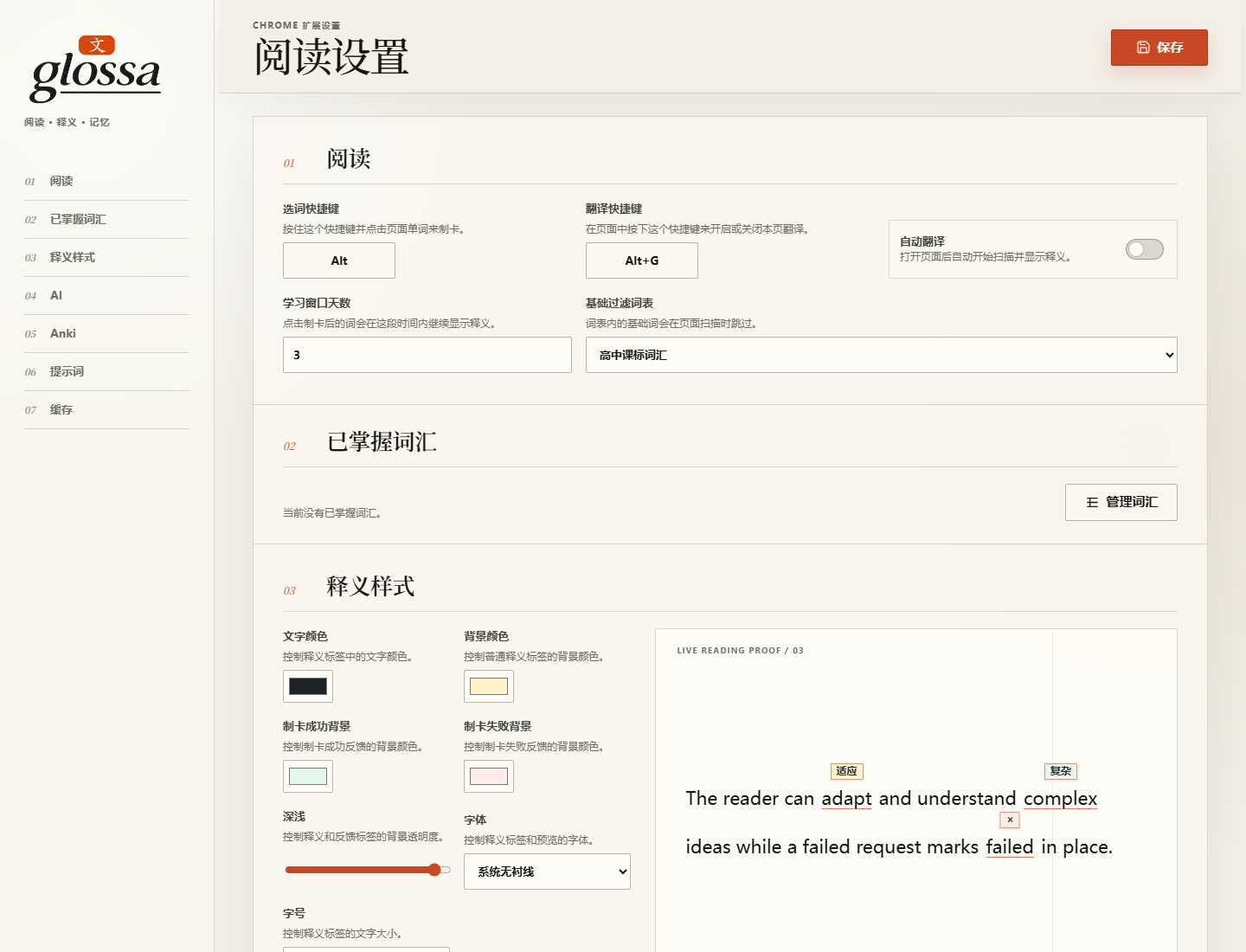
在设置中选择适合自己的词表,管理已掌握词汇。翻译方式、快捷键、释义样式和 Anki 连接也在这里设置。

  1. 01
    管理已掌握词汇

    可按词表过滤,也可手动标记。显示过释义的词会自动记入已掌握词汇;加入 Anki 的词在设定天数内继续显示释义。

  2. 02
    选择翻译方式

    可以使用普通 AI 翻译,也可以用 Jev 根据句子从本地词典中选择释义。

  3. 03
    调整释义样式

    修改颜色、字体、字号或透明度时,可以先在设置页查看效果。

  4. 04
    在本地保存记录

    设置、词汇学习记录和释义缓存保存在当前浏览器中。

Glossa 设置页,可配置翻译方式、词汇过滤和释义样式

安装说明

安装
Glossa

从 GitHub 下载扩展,按这三个步骤安装。首次使用时,选择翻译方式并测试连接;需要制卡时再配置 Anki。

下载最新版
  1. 01
    下载并解压

    从 GitHub 下载最新版扩展 ZIP,解压到之后不会移动或删除的文件夹。

  2. 02
    打开扩展管理页

    在 Chrome 地址栏输入 chrome://extensions,开启开发者模式。

  3. 03
    加载扩展

    点击“加载已解压的扩展程序”,选择刚才解压的文件夹。